
Interfacing | Electronics
Active Filters
Electronics
Suggestions for Interfacing | Electronics

The Canon IFC-200U interface cable is a high-quality, black camera cable designed for use with the EOS 40D, 1D III, and 1Ds III cameras. It provides reliable connectivity to transfer images between the camera and computer or printer.
The Canon IFC-200U interface cable is a high-quality, black camera cable designed for use with the EOS 40D, 1D III, and 1Ds III cameras. It provides reliable connectivity to transfer images between the camera and computer or printer.
The Canon IFC-200U interface cable is a high-quality, black camera cable designed for use with the EOS 40D, 1D III, and 1Ds III cameras. It provides reliable connectivity to transfer images between the camera and computer or printer.
The Canon IFC-200U interface cable is a high-quality, black camera cable designed for use with the EOS 40D, 1D III, and 1Ds III cameras. It provides reliable connectivity to transfer images between the camera and computer or printer.
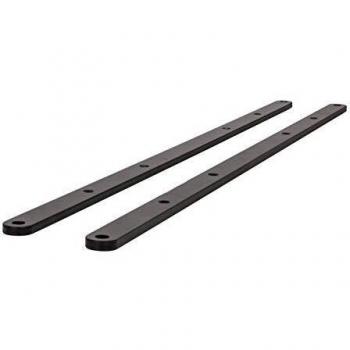
B-Tech's interface adaptor arms are designed for use with VESA 600 x 400 panels. These black, mounting arms have a width of 620mm and depth of 6mm, standing at 20mm tall.
B-Tech's interface adaptor arms are designed for use with VESA 600 x 400 panels. These black, mounting arms have a width of 620mm and depth of 6mm, standing at 20mm tall.
B-Tech's interface adaptor arms are designed for use with VESA 600 x 400 panels. These black, mounting arms have a width of 620mm and depth of 6mm, standing at 20mm tall.
B-Tech's interface adaptor arms are designed for use with VESA 600 x 400 panels. These black, mounting arms have a width of 620mm and depth of 6mm, standing at 20mm tall.

USB 3.0 for data speeds up to 5 Gbps, which is 10 x faster than USB 2.0 - 5 A are available to fast charge smartphones and/or tablets when hub is plugged into a wall outlet for external power - Plug and Play installation with no driver downloads necessary
USB 3.0 for data speeds up to 5 Gbps, which is 10 x faster than USB 2.0 - 5 A are available to fast charge smartphones and/or tablets when hub is plugged into a wall outlet for external power - Plug and Play installation with no driver downloads necessary
USB 3.0 for data speeds up to 5 Gbps, which is 10 x faster than USB 2.0 - 5 A are available to fast charge smartphones and/or tablets when hub is plugged into a wall outlet for external power - Plug and Play installation with no driver downloads necessary
USB 3.0 for data speeds up to 5 Gbps, which is 10 x faster than USB 2.0 - 5 A are available to fast charge smartphones and/or tablets when hub is plugged into a wall outlet for external power - Plug and Play installation with no driver downloads necessary
USB 3.0 for data speeds up to 5 Gbps, which is 10 x faster than USB 2.0 - 5 A are available to fast charge smartphones and/or tablets when hub is plugged into a wall outlet for external power - Plug and Play installation with no driver downloads necessary
USB 3.0 for data speeds up to 5 Gbps, which is 10 x faster than USB 2.0 - 5 A are available to fast charge smartphones and/or tablets when hub is plugged into a wall outlet for external power - Plug and Play installation with no driver downloads necessary
USB 3.0 for data speeds up to 5 Gbps, which is 10 x faster than USB 2.0 - 5 A are available to fast charge smartphones and/or tablets when hub is plugged into a wall outlet for external power - Plug and Play installation with no driver downloads necessary
USB 3.0 for data speeds up to 5 Gbps, which is 10 x faster than USB 2.0 - 5 A are available to fast charge smartphones and/or tablets when hub is plugged into a wall outlet for external power - Plug and Play installation with no driver downloads necessary
USB 3.0 for data speeds up to 5 Gbps, which is 10 x faster than USB 2.0 - 5 A are available to fast charge smartphones and/or tablets when hub is plugged into a wall outlet for external power - Plug and Play installation with no driver downloads necessary

One of the following cable kits is required to connect the 8 port switch to the HSBP in R2208, R2208+8 and R2224 systems: - A2U8PSWCXCXK1. - A2U8PSWCXCXK2. - A2U8PSWCXCXK3.
One of the following cable kits is required to connect the 8 port switch to the HSBP in R2208, R2208+8 and R2224 systems: - A2U8PSWCXCXK1. - A2U8PSWCXCXK2. - A2U8PSWCXCXK3.
One of the following cable kits is required to connect the 8 port switch to the HSBP in R2208, R2208+8 and R2224 systems: - A2U8PSWCXCXK1. - A2U8PSWCXCXK2. - A2U8PSWCXCXK3.
One of the following cable kits is required to connect the 8 port switch to the HSBP in R2208, R2208+8 and R2224 systems: - A2U8PSWCXCXK1. - A2U8PSWCXCXK2. - A2U8PSWCXCXK3.

Datalogic CAB-408 RS-232 Pwr Coil 9-Pin Female Cable: A high-quality, coiled serial cable with DB-9 female connectors on both ends, specifically designed for connecting devices using the RS-232 protocol.
Datalogic CAB-408 RS-232 Pwr Coil 9-Pin Female Cable: A high-quality, coiled serial cable with DB-9 female connectors on both ends, specifically designed for connecting devices using the RS-232 protocol.
Datalogic CAB-408 RS-232 Pwr Coil 9-Pin Female Cable: A high-quality, coiled serial cable with DB-9 female connectors on both ends, specifically designed for connecting devices using the RS-232 protocol.
Datalogic CAB-408 RS-232 Pwr Coil 9-Pin Female Cable: A high-quality, coiled serial cable with DB-9 female connectors on both ends, specifically designed for connecting devices using the RS-232 protocol.
Datalogic CAB-408 RS-232 Pwr Coil 9-Pin Female Cable: A high-quality, coiled serial cable with DB-9 female connectors on both ends, specifically designed for connecting devices using the RS-232 protocol.

104 keys allow for efficient data input - Featuring 2 Hi-speed USB 2 0 ports - 7 multimedia keys and 7 hot keys
104 keys allow for efficient data input - Featuring 2 Hi-speed USB 2 0 ports - 7 multimedia keys and 7 hot keys

The Microconnect SVGA HD15 2m is a VGA cable that connects your computer to a monitor or projector. It features a black color and a length of 2 meters, making it ideal for use in home or office settings.

Easy and convenient charging and storage of your headset at your desk - Simplistic design which keeps your desk organised – stable design with non-slip rubber feet - Simply set the headset on the stand's micro-USB plug to begin charging immediately –
Easy and convenient charging and storage of your headset at your desk - Simplistic design which keeps your desk organised – stable design with non-slip rubber feet - Simply set the headset on the stand's micro-USB plug to begin charging immediately –
Easy and convenient charging and storage of your headset at your desk - Simplistic design which keeps your desk organised – stable design with non-slip rubber feet - Simply set the headset on the stand's micro-USB plug to begin charging immediately –
Easy and convenient charging and storage of your headset at your desk - Simplistic design which keeps your desk organised – stable design with non-slip rubber feet - Simply set the headset on the stand's micro-USB plug to begin charging immediately –
Easy and convenient charging and storage of your headset at your desk - Simplistic design which keeps your desk organised – stable design with non-slip rubber feet - Simply set the headset on the stand's micro-USB plug to begin charging immediately –
Easy and convenient charging and storage of your headset at your desk - Simplistic design which keeps your desk organised – stable design with non-slip rubber feet - Simply set the headset on the stand's micro-USB plug to begin charging immediately –
Easy and convenient charging and storage of your headset at your desk - Simplistic design which keeps your desk organised – stable design with non-slip rubber feet - Simply set the headset on the stand's micro-USB plug to begin charging immediately –