
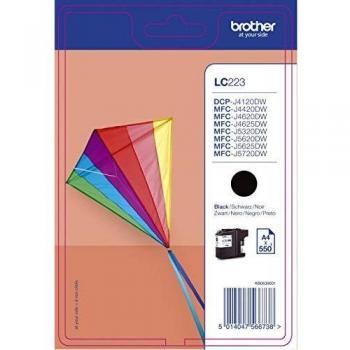
Original Brother Ink Cartridge Black
The Brother LC-223BK is a high-yield black ink cartridge for inkjet printers, offering 550 pages of printing. It is compatible with Brother DCP-J4120 and other models.
 Brother DCP-L3560CDW LED Multifunction Printer
 UK Office Direct Limited
 Euroffice
 Back to the Office
 GamingKit
The Brother DCP‑L3560CDW is a compact, high‑performance all‑in‑one printer designed for modern offices and home workspaces. Combining printing, copying, scanning, and faxing into one sleek unit, it delivers reliable colour output with fast speeds and advanced connectivity options.
The DCP‑L3560CDW’s colour laser engine delivers high‑resolution output that is ideal for marketing materials, presentations, and everyday office documents. The 26 ppm speed ensures minimal waiting time even during peak periods, while the LED light source maintains consistent colour fidelity across long print runs.
With built‑in Wi‑Fi, users can connect multiple devices to the printer without the need for a dedicated network cable. The device supports AirPrint, Google Cloud Print, and Brother iPrint&Scan apps, enabling printing directly from mobile phones or tablets.
Beyond printing, the DCP‑L3560CDW offers:
The compact footprint (approximately 17.5 × 15.8 × 12.6 inches) fits comfortably in small offices or home setups. The ergonomic layout places the most frequently used controls within easy reach, while the touchscreen provides quick access to advanced settings.
The printer’s toner saving mode reduces ink consumption by up to 30 %, extending the life of each cartridge. The LED lamp’s long lifespan minimizes replacement costs. Additionally, the device includes a built‑in diagnostic system that alerts users to potential issues before they become critical.
In addition to Wi‑Fi, the DCP‑L3560CDW offers:
The unit’s Energy Star certification reflects its low power consumption during idle periods. Automatic sleep mode activates after a brief period of inactivity, further reducing energy usage. The LED lamp also contributes to lower heat output compared to traditional laser lamps.
The Brother DCP‑L3560CDW exemplifies modern multifunction printing technology. Its blend of high‑quality colour output, rapid wireless connectivity, and versatile all‑in‑one capabilities make it an excellent choice for anyone seeking a reliable, efficient, and user‑friendly printer solution.
 Brother is a Japanese brand that produces a wide range of electronics, including printers, sewing machines, and scanners. The company has a strong reputation for quality and innovation, and its products are popular among consumers and businesses alike.
The Brother LC-223BK is a high-yield black ink cartridge for inkjet printers, offering 550 pages of printing. It is compatible with Brother DCP-J4120 and other models.

The product is a genuine Brother TN-243CMYK toner cartridge value pack that includes original black, cyan, magenta, and yellow ink for compatible printers. It provides superior print quality and reliability.

Prints 6,500 pages in accordance with ISO/IEC 19798 - Genuine Brother TN-423BK black high yield laser toner cartridge, delivering an increased print volume and lower cost per page - Genuine Brother toner cartridges are rigorously tested to print perfectly

Get vibrant prints with the genuine Brother LC223M Magenta Ink Cartridge. High-quality, 550-page yield for consistent results. Shop now for reliable ink!

Brother's TN-248M standard yield magenta toner cartridge is designed for high quality printing and 1000 pages of use. Compatible with the BRTN248M printer model, it ensures sharp text and vibrant images every time.

Prints up to 2,300 pages in accordance with ISO/IEC 19798 - Genuine Brother TN-247Y yellow high yield laser toner cartridge, delivering an increased print volume and lower cost per page - Genuine Brother toner cartridges are rigorously tested to print per