
Docking Stations
Suggestions for Docking Stations
USB-C hub Surface Dock Docking station HP docking station OWC docking station Acer docking station Asus docking station Dell docking station HDMI docking station PCIe docking station Anker docking station USB-C docking station Belkin docking station Elgato docking station Laptop docking station Lenovo docking station Targus docking station Compact docking station Satechi docking station USB 3.0 docking station USB 3.1 docking station USB 3.2 docking station CalDigit docking station Latitude docking station Plugable docking station Portable docking station StarTech docking station ThinkPad docking station Wireless docking station Alienware docking station Universal docking station Kensington docking station DisplayPort docking station ExpressCard docking station MacBook Air docking station MacBook Pro docking station Thunderbolt docking station USB-C travel docking station Thunderbolt 2 docking station Thunderbolt 3 docking station


The Port Designs 901910W-UK is a sleek and efficient USB 3.2 Gen 2 Type-C laptop dock that enhances connectivity with multiple ports. Its compact design in black makes it an ideal solution for professionals seeking streamlined productivity.

A powerful Dell WD19 docking station delivers 180W charging, nine versatile ports including HDMI, DisplayPort, Ethernet, and dual USB‑C/USB‑3.2 connections for seamless desktop expansion from a single laptop.
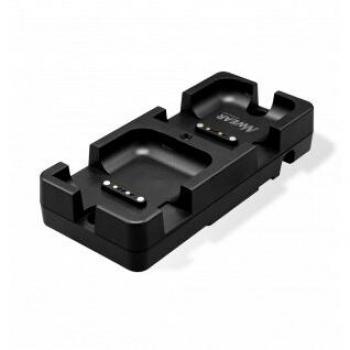
The Newland CD50 Mobile Docking Station delivers a sleek, black charging cradle with dual slots for barcode scanners, USB-C connectivity, and a magnetic support that keeps devices secure while powering up efficiently.

Compact and powerful, the Lenovo ThinkPad Ultra Dock 90W turns a laptop into a full workstation with USB‑C charging, dual HDMI outputs, Ethernet, SD card reader, and multiple USB ports for all peripherals.


The Dell Simple Port-Replicator is a versatile docking station that offers easy connectivity to multiple devices. It features 13 ports, including HDMI, VGA, Ethernet, and audio out, making it ideal for use in home or office settings.

The HP USB‑C Dock G5 expands a single laptop port into ten high‑speed connections, offering dual HDMI 4K displays, Gigabit Ethernet, an SD card reader, and up to 100W power delivery for seamless Windows use.

The Dell Universal Thunderbolt Dock UD22 expands a laptop into a full workstation with ten ports, including dual HDMI, USB‑C, Ethernet, and SD card slots, all housed in a sleek black chassis that fits any workspace.

Elevate your workstation with Lenovo’s ThinkPad Universal Thunderbolt 4 dock, delivering ultra‑fast data transfer and power delivery through a single cable while expanding connectivity with multiple USB ports, HDMI, Ethernet, and audio jacks for seamless multitasking.


