
KVM switches
Suggestions for KVM switches
KVM switch KVM extender DVI KVM switch USB KVM switch VGA KVM switch ATEN KVM switch HDMI KVM switch Mini KVM switch PS/2 KVM switch Slim KVM switch Gefen KVM switch USB-C KVM switch Belkin KVM switch IOGEAR KVM switch KVM matrix switch Avocent KVM switch Compact KVM switch Desktop KVM switch KVM over IP switch USB 2.0 KVM switch USB 3.0 KVM switch Plugable KVM switch Portable KVM switch StarTech KVM switch TRENDnet KVM switch Two-port KVM switch ATEN HDMI KVM switch Four-port KVM switch KVM switch with HDMI Rackmount KVM switch ATEN USB-C KVM switch Eight-port KVM switch IOGEAR USB KVM switch KVM switch with audio Tripp Lite KVM switch Wall-mount KVM switch DisplayPort KVM switch Dual monitor KVM switch Four-monitor KVM switch StarTech USB KVM switch

The StarTech.com 16 Port Rackmount KVM Console features a 17-inch LCD monitor, integrated KVM switch, and 6ft cables. It supports both USB and VGA, providing full functionality in a sleek 1U LCD KVM drawer design.

STARTECH.COM (0065030841702 / 1875215000) | Star Tech

Experience seamless multi-monitor management with the ATEN CS1744 4-Port USB VGA Dual Display/Audio KVMP Switch. Easily control up to four PCs with built-in USB and dual display support, plus front panel selection for convenience.

The Aten 6m USB KVM Cable is a reliable and high-quality solution for connecting your computer to an ACS1208A switch. With its 6 meters in length, this cable ensures easy access to the connected devices while offering seamless control over them.

ATEN VS82CZ-AT-E is a VGA video splitter that allows you to duplicate your computer's display onto two separate monitors. Its dual output design ensures seamless and simultaneous multi-screen viewing without any signal loss or distortion.

Aten 5m 2L‑1705 KVM Daisy Chain Cable is a shielded DB‑25 male to female cable designed for daisy‑chaining multiple KVM devices. It supports high‑speed data transfer, low latency and reliable video signal integrity.

Innovative cable technology to minimize cross-talk and deliver superb video quality for your high resolution applications - Aluminum shield to eliminate EMI/RFI interference and ensure signal integrity and error-free transmission - All-In-One bonded cable

Superior video quality – 4096 x 2160 @ 60Hz and 3840 x 2160 @ 60Hz; 2-Port USB 3.1 Gen 1 hub with Supersede 5 Gaps data transfer rates - Quad-Display – Easily connect two CS1944DP units for a second dual-screen setup controlled through a single connec

A KVM console controls up to 32 directly connected computers - Space-saving RJ-45 connectors and Cat 5e/6 cabling - By daisy chaining up to 31 additional KH1532A switches up to 1024 computers can be controlled from the original KVM console - Console Conve

StarTech.com 4 Port Professional VGA USB KVM Switch enables controlling multiple computers using a single monitor, keyboard and mouse. It is 1U rack-mountable for easy installation in server racks.

This product is a StarTech.com 4-Port HDMI KVM switch that supports dual displays, allowing you to control up to four computers with just one keyboard and mouse. It also features audio support and a USB 3.0 hub.

Streamline server management with the StarTech.com Rackmount KVM Console. This single-port VGA device features a compact 1U design and comes with a 17" LCD monitor for easy access within your rack.

The StarTech.com RKCONS1708K is an 8 port rackmount KVM console with a 17" LCD monitor and integrated KVM switch. It allows you to control up to eight computers from one device, including support for USB and VGA connections.

The StarTech.com Rackmount KVM Console is a fully-featured 1U LCD KVM drawer with a single port VGA KVM and a 17-inch LCD monitor for server rack use.

Switch between two triple head computerswhile sharing three DVI displaysspeakers & mic USB Keyboard/Mouseand USB 2.0 peripherals/DVI KVM Switch/USB DVI KVM/Triple Monitor KVM/Multi Monitor KVM/2 Port DVI KVM/Resoluations up t

The ATEN CS64U is a 4-port USB KVM switch, enabling seamless control of up to four computers using one set of keyboard, mouse, and monitor. Its sleek black design integrates effortlessly into any workspace.

StarTech.com 4 Port DisplayPort KVM Switch, supporting dual monitors with 4K resolution at 60Hz. Provides seamless control between connected devices while maintaining a sleek black design. SV431DPDDUA2.
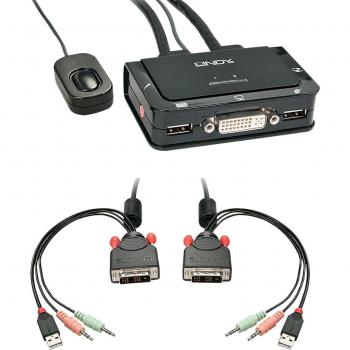
LINDY (4002888423410 / 42341)


Switch between two PCs with a single monitor, keyboard and mouse while enjoying full 3840×2160@60Hz clarity, stereo audio, mic input and USB‑A connectivity—all in one sleek black unit.


