
KVM switches
Suggestions for KVM switches
KVM switch KVM extender DVI KVM switch USB KVM switch VGA KVM switch ATEN KVM switch HDMI KVM switch Mini KVM switch PS/2 KVM switch Slim KVM switch Gefen KVM switch USB-C KVM switch Belkin KVM switch IOGEAR KVM switch KVM matrix switch Avocent KVM switch Compact KVM switch Desktop KVM switch KVM over IP switch USB 2.0 KVM switch USB 3.0 KVM switch Plugable KVM switch Portable KVM switch StarTech KVM switch TRENDnet KVM switch Two-port KVM switch ATEN HDMI KVM switch Four-port KVM switch KVM switch with HDMI Rackmount KVM switch ATEN USB-C KVM switch Eight-port KVM switch IOGEAR USB KVM switch KVM switch with audio Tripp Lite KVM switch Wall-mount KVM switch DisplayPort KVM switch Dual monitor KVM switch Four-monitor KVM switch StarTech USB KVM switch

4-port Display Port KVMPTM switch with USB 3.1 Gen 1 hub and 2.1 surround sound audio One USB console controls 4 computers and 2 USB peripherals Computer selection via front pushbuttons, quick buttons and mouse Independent switching of

StarTech (5054484159674 / SV565UTPUEU) - AC adapter included - Manual - Plug and play - AC adapter output current: 0.6 A - Input current: 0.2 A - AC adapter output voltage: 9 V - AC input voltage: 100 - 240 V

A dual HDMI KVM switch with 4K 60Hz support and USB connectivity, ideal for managing multiple devices.

One dual-screen USB console controls two/four dual-screen computers and two additional USB devices - Multi-View Display – Easily connect two CS1642A/1644A's units for a second dual-screen setup controlled through a single connection - Superior video qua

Intellinet (7666235064410 / 506441) - FCC Class B, CE - Metal - USB, PS/2 - DC - VGA - DC input voltage: 9 V - Depth: 440 mm - Height: 45 mm - Width: 155 mm - HD type: HD - Maximum resolution: 1600 x 900 pixels


The single‑port ATEN KN1000A delivers crisp 1920×1200 VGA output with seamless local and remote control, integrating a PDU for power management and RS‑232 serial access in one compact black unit.


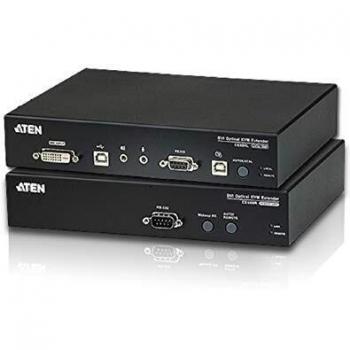
Extend high‑resolution DVI signals up to 1920×1200 and USB peripherals over single‑mode fiber for 600 m, delivering crisp video, reliable mouse control, and full keyboard input with minimal latency in a compact rack‑mountable unit.


Control multiple servers from one 17‑inch HD LCD console with a built‑in US keyboard, eight Cat 5 ports for seamless KVM switching, clear display and ergonomic design.

Dual‑port KVM switch supporting dual 4K/8K displays via DisplayPort 1.4, with 60 Hz 8K and 144 Hz 4K output, 2× USB 10 Gbps ports, hotkey switching, and full DP 1.4 bandwidth for high‑resolution multi‑monitor setups.

