
 NETGEAR 26-Port SFP/Gigabit Stackable Fully Managed Switch
NETGEAR (0069060115925 / GSM7328FS-200NES) - 10g support - Broadcast storm control - Built-in processor - Ethernet LAN - Flow control support - Full Duplex - IGMP snooping - IP routing - Jumbo frames support
Stores where to buy this product
Similar products

NETGEAR 26‑Port SFP/Gigabit Stackable Fully Managed Switch is engineered to deliver high‑performance networking solutions for enterprise environments that demand robust, scalable, and secure connectivity.
Architectural Design & Physical Profile
The switch adopts a 1U rackmount form factor, measuring 392 mm in depth and 445 mm in width. Its compact footprint (42 mm height) allows seamless integration into standard 19‑inch racks, while the lightweight build of 6.9 kg facilitates easy handling during deployment.
Port Configuration & Connectivity Options
Equipped with a total of 26 ports, the device offers:
- 24 SFP+ slots for high‑speed fiber connectivity, supporting up to 10 Gbps per port.
- 2 x 10G Copper ports (10GBASE‑T) for direct copper links.
- 4 RJ‑45 Ethernet ports that provide standard Gigabit connectivity using 10/100/1000 Base‑T(X).
The combination of SFP+ and copper interfaces ensures versatile deployment across diverse network topologies, from data centers to campus backbones.
Performance & Throughput Characteristics
With a switching capacity of 384 Gbit/s and a maximum data transfer rate of 10 Gbps, the switch can handle demanding traffic loads. The internal processor, a QorIQ P1010 running at 800 MHz, manages routing and switching tasks efficiently.
The device supports 107.1 Mpps throughput and maintains low latency of 3.5/4.1 µs. A generous 16 MB packet buffer memory ensures smooth handling of bursty traffic, while the 8‑queue architecture allows fine‑grained traffic prioritization.
Advanced Layer 2+ Features
The switch operates at L2+, providing:
- VLAN support with up to 4096 VLANs, enabling segmentation and security isolation.
- Spanning Tree Protocol (STP) and its variants (RSTP, MSTP) for loop prevention.
- Link Aggregation Control Protocol (LACP) for bandwidth scaling across multiple links.
- IGMP snooping and multicast support to optimize group traffic distribution.
- Full flow control, rate limiting, and broadcast storm control to safeguard network stability.
Layer 3 Routing Capabilities
Beyond switching, the device offers robust IP routing features:
- Static routing with support for up to 512 routes.
- Dynamic routing protocols via SNMP and RMON interfaces.
- Integrated DHCP server and client functions, simplifying IP address management.
- Support for both IPv4 and IPv6, ensuring future‑proof connectivity.
Security & Management Excellence
The switch incorporates a comprehensive security stack:
- Authentication through SSH, SSHv2, RADIUS, HTTPS, HTTP, Dot1x.
- Encryption using SSL/TLS for secure web and remote management.
- MAC address filtering and a large 32 000‑entry MAC table to control network access.
- Full support for SNMP v1, v2c, v3, along with RMON variants, enabling detailed monitoring.
- Event logging and system event logs provide audit trails for compliance.
Management Interfaces & Tools
The switch offers multiple management pathways:
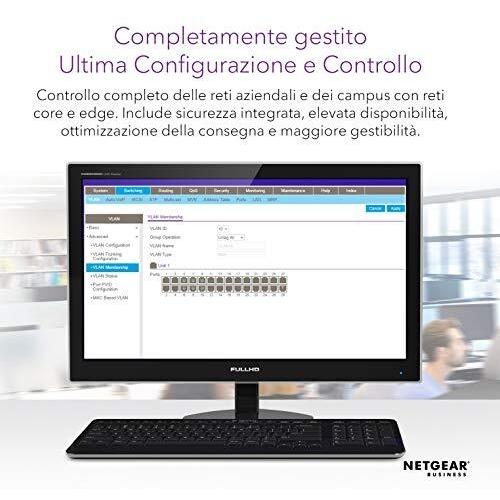
- Web‑based GUI accessible via HTTPS, providing intuitive configuration.
- Command‑line interface through an RS‑232 console port for advanced scripting.
- Remote administration via SSH and SNMP, facilitating integration with network management systems.
Reliability & Certification Standards
The device meets stringent industry certifications:
- CE, FCC, VCCI, EN, C‑Tick, CSA, UL/cUL for safety and electromagnetic compliance.
- Operating altitude range of 0–3000 m, suitable for diverse installation environments.
- Built with a 128 MB flash memory and 512 MB internal RAM to store configurations and run the operating system reliably.
Power & Environmental Considerations
The switch operates on a single power supply unit, accepting input voltage of 240 V at 63 Hz. Its noise level is maintained at a low 35.6 dB, ensuring minimal interference in quiet data center settings.
Scalability Through Stackable Architecture
Designed for enterprise growth, the switch supports stackable configurations that allow multiple units to function as a single logical device. This feature simplifies management and expands port density without compromising performance.
Conclusion
NETGEAR 26‑Port SFP/Gigabit Stackable Fully Managed Switch delivers an exceptional blend of high throughput, advanced Layer 2+ features, robust routing capabilities, and stringent security controls. Its stackable design, comprehensive management options, and compliance with global certifications make it a reliable foundation for modern enterprise networks that require scalability, performance, and secure connectivity.
| This product in Comparor | |
|---|---|
|
Category
This product is cataloged in our store in these categories
|
- Network hubs and switches devices |
|
International
Find this product in one of our international stores
|
 |
| Colors
Predominant colors of the product |
|
| Identifiers | |
| Brand |  NETGEAR is a brand of networking equipment, including routers, switches and wireless access points. The company was founded in 1996 and is headquartered in San Jose, California. |
| Model | NETGEAR GSM7328FS-200NES |
| MPN | NETGEAR GSM7328FS-200NES |
| ID | 13946122 |
| Dimensions / Weight | |
| Key Features | |
|
10g support Indicates whether the product supports 10 Gigabit Ethernet (10 GbE) connectivity, either through dedicated 10 GbE ports or via SFP+ modules that enable 10 GbE operation.
|
Yes |
|
Authentication method A list of authentication mechanisms that a device or service can use to verify users or devices, such as RADIUS, TACACS+, SSH, EAP, LDAP, and other protocols. The value is a comma‑separated string where each entry represents an individual method available for secure access.
|
Secure Shell (SSH), Secure Shell v.2 (SSH2), RADIUS, HTTP, HTTPS, Dot1x |
|
Bandwidth The highest rate at which a device can transfer data, expressed as a frequency in hertz (Hz). It indicates the maximum throughput capability of the component or connection and allows comparison across similar products.
|
184 Gbit/s |
|
Basic switching RJ-45 Ethernet ports quantity Indicates the total count of physical RJ‑45 Ethernet connectors available on a device for wired network connectivity. The value is an integer representing how many separate ports can be used to connect Ethernet cables.
|
4 |
|
Broadcast storm control Indicates whether a network device includes a feature that limits the amount of broadcast traffic to prevent network congestion and potential outages caused by excessive broadcast packets.
|
Yes |
|
Built-in processor Indicates whether the product contains a built‑in central processing unit (CPU) that can execute instructions without requiring an external processor module. A value of "Yes" means the device has such a CPU; "No" means it does not.
|
Yes |
|
Cables included A list of the cable types that are supplied with the product, such as USB, HDMI, VGA, DisplayPort, LAN (RJ‑45), SATA, audio or other relevant connectors.
|
AC |
|
Cabling technology The type of cable or connector technology used by the product, such as Ethernet standards (e.g., 10/100Base‑T, 1000BASE‑T, 10GBase‑T) or other networking cable types. It indicates the physical medium and protocol supported for data transmission.
|
10/100/1000 Base-T(X) |
|
Certification A list of official certifications or compliance marks that the product has received from regulatory bodies, safety organizations, or industry standards groups. Each entry represents a distinct certification such as CE, FCC, RoHS, UL, or WEEE, and may include additional details like version numbers or specific test reports.
|
CE, FCC, VCCI, EN, C-Tick |
|
Connectivity technology The network and data interface technologies supported by the product, such as Wired, Wireless, USB, Bluetooth, or combinations thereof. Each value represents a distinct technology that can be used for communication or power delivery.
|
Wired |
|
Console port Represents how many console ports are physically present on the product. The value is a simple integer indicating the total count of console connectors, regardless of type or version.
|
RS-232 |
|
Copper ethernet cabling technology A comma‑separated list of the copper Ethernet standards supported by a device, such as 10BASE‑T, 100BASE‑TX, or 1000BASE‑T. Each entry indicates a specific speed and physical specification that the product can transmit over its RJ‑45 ports.
|
1000BASE-T,100BASE-T,100BASE-TX,10BASE-T,10GBASE-T |
|
Depth The linear measurement of an object from front to back or top to bottom, expressed in a physical unit such as millimeters, centimeters, inches, etc. It indicates how deep the item is and can be used for fitting, compatibility, or spatial planning.
|
392 mm |
|
DHCP features A comma‑separated list of the DHCP roles and options that a device can provide or use, such as server, client, relay, snooping, option 82 support, and IPv6 variants. The value may contain multiple items for a single product.
|
DHCP server,DHCP client |
|
Ethernet interface type A list of the Ethernet standards that a product supports, such as Fast Ethernet (10/100 Mbps), Gigabit Ethernet (1 Gbps), 2.5 GbE, 10 GbE, and other variants. Each value is a free‑text label describing one supported interface; multiple values are separated by commas when the device offers more than one speed or generation.
|
Gigabit Ethernet |
|
Ethernet LAN Indicates whether the product includes an Ethernet LAN interface for wired network connectivity, allowing data transmission over RJ‑45 or compatible cables.
|
Yes |
| Fiber optic connector | SFP,SFP+ |
|
Flash memory The total amount of internal flash memory available in a device, expressed as a data size (e.g., megabytes or gigabytes). This attribute indicates how much data can be stored on the device’s built‑in flash storage.
|
128 MB |
|
Flow control support Indicates whether a device includes hardware or firmware that can manage the flow of data on its interfaces, such as enabling or disabling automatic pause frames, handling congestion, or providing other traffic‑control mechanisms. A value of "Yes" means the feature is present and can be configured; "No" indicates it is not available.
|
Yes |
|
Form Factor Specifies the physical configuration or design of a product, such as ATX, Micro‑ATX, Mini‑ITX, tower, case with cover, etc. It describes how the device is built and what mounting or expansion options it supports.
|
1U |
|
Full Duplex Indicates whether a device can transmit and receive data simultaneously on two channels, allowing bidirectional communication without delay. A value of "Yes" means the device supports full‑duplex operation; a value of "No" indicates it operates only in half‑duplex mode.
|
Yes |
|
Height The vertical dimension of a product measured from its lowest to highest point. It is expressed in a physical unit such as millimetres, centimetres or inches and applies to any item where height is relevant, including books, electronics, furniture and other objects.
|
42 mm |
| IGMP snooping | Yes |
|
Input frequency The frequency of the alternating current supplied to a power supply or charger, expressed in hertz (Hz). It indicates the acceptable operating range for the electrical mains that powers the device, ensuring proper functionality and safety.
|
63 Hz |
|
Input voltage The range of alternating current voltage that a charger or power supply can accept, expressed in volts (V). It specifies the minimum and maximum input voltages compatible with the device.
|
240 V |
|
Internal memory The total amount of internal memory available in a device, expressed as a data size such as megabytes (MB) or gigabytes (GB). It indicates how much information the component can hold for active processes and affects multitasking performance.
|
512 MB |
|
IP routing Indicates whether the product can perform IP routing, forwarding packets between networks based on destination addresses.
|
Yes |
| Jumbo frames support | Yes |
|
Latency The time delay between a request and its response in a device or component, expressed as a duration. It indicates how quickly data can be transmitted or processed and is useful for comparing performance across similar products.
|
3.5/4.1 µs |
|
LED indicators A list of the functions or statuses that an LED indicator on a device can display, such as power status, activity, link, and other operational signals.
|
Link,Power |
|
Link aggregation Indicates whether the device can combine multiple network connections into a single logical link to increase bandwidth or provide redundancy.
|
Yes |
|
MAC address filtering Indicates whether the device supports filtering network traffic based on MAC addresses. When enabled, the device can allow or block communication for specific devices identified by their MAC address.
|
Yes |
|
MAC address table The total count of unique MAC addresses that the device can store in its forwarding table. This value indicates how many devices can be simultaneously connected before the switch must start discarding or aging out older entries.
|
32000 entries |
|
Management protocols A list of network protocols that a device can use for configuration, monitoring and remote management, such as SNMP, HTTP/HTTPS, Telnet, SSH or other standard interfaces. Each protocol is represented by its common name and may be separated by commas or slashes in the source data.
|
SNMP 1, SNMP 2, RMON 1, RMON 2, RMON 3, RMON 9, SNMP 3, SSH, SSH-2 |
|
Maximum data transfer rate The highest theoretical speed at which a device can send or receive data, expressed in bits per second (bps) or its multiples such as kbps, mbps, gbps, etc. This value represents the upper bound of throughput under optimal conditions and is useful for comparing performance across devices and interfaces.
|
10 Gbit/s |
| MIB support | MIB-II, Bridge-MIB, Eth-MIB, VLAN-MIB, SMON-MIB, Client-MIB, Entity-MIB, LLDP-MIB, LLDP-MED-MIB |
|
Multicast support Indicates whether the device can send or receive IP multicast traffic, allowing it to participate in group communications such as streaming media, IPTV, and certain network protocols that rely on multicast distribution.
|
Yes |
|
Noise level The sound intensity produced by a product, expressed in decibels (dB) or sones. It indicates how loud the device is during operation and helps users assess suitability for quiet environments.
|
35.6 dB |
|
Number of queues The total count of independent processing or scheduling queues that the product supports. A queue is a logical buffer used to manage tasks, packets, or requests in order, allowing the device to handle multiple streams or operations concurrently.
|
8 |
|
Operating altitude The range of altitudes (in meters) at which a product or component can operate reliably without performance degradation due to changes in atmospheric pressure, temperature, or other altitude‑related effects.
|
0 - 3000 m |
|
Packet buffer memory The amount of temporary storage that a device allocates in its internal memory for buffering data before processing or forwarding it. Expressed as a digital capacity (e.g., kilobytes, megabytes), this value indicates how much information the hardware can hold at once and influences performance when handling high‑throughput or bursty traffic.
|
16 MB |
|
Port mirroring Indicates whether the device supports port mirroring, a feature that allows one or more ports to copy traffic from another port for monitoring or analysis purposes.
|
Yes |
| Power LED | Yes |
|
Processor frequency The fundamental operating frequency of a processor, expressed in hertz (Hz). It indicates the speed at which the CPU runs under normal conditions and is typically reported in gigahertz (GHz) or megahertz (MHz). This value helps users compare performance potential across different models.
|
800 MHz |
|
Processor model Identifies the exact model of the central processing unit used in a device, including brand and numeric designation such as "Intel Core i5-8250U" or "AMD Ryzen 7 3700X". This value allows users to distinguish between different processor families, generations, and performance levels.
|
QorIQ P1010 |
|
Rack mounting Indicates whether a product is designed to be mounted in a rack system. The value is typically "Yes" or "No", but may also include a measurement such as "1U" or "2U" to specify the height occupied by the device.
|
Yes |
|
Rate limiting Indicates whether the device supports rate limiting, a feature that restricts the maximum data transfer speed or bandwidth to prevent network congestion or ensure fair usage among connected devices. A value of "Yes" means the device can enforce such limits, while "No" indicates it does not provide this capability.
|
Yes |
|
Safety A list of safety and regulatory certifications that a product complies with, such as CE, UL, FCC, or other regional standards.
|
CE, CSA, UL/cUL |
|
Security algorithms Una lista de los algoritmos criptográficos y protocolos de seguridad que el producto soporta, como cifrado (AES, WEP), autenticación (WPA2-PSK, EAP-TLS) o protocolos de red (HTTPS, SSH). Cada elemento describe un algoritmo individual; la lista puede contener varios valores separados por comas.
|
802.1x RADIUS,HTTPS,SSH,SSH-2,SSL/TLS |
|
SFP module slots quantity The total count of Small Form‑factor Pluggable (SFP) ports available on a networking device, such as switches or routers. Each port can accept an SFP transceiver module for fiber or copper connections, allowing the device to support additional network interfaces.
|
24 |
|
SFP/SFP+ slots quantity The total count of Small Form‑factor Pluggable Plus (SFP+) ports available on a networking device, such as switches or routers. Each port can accept an SFP+ transceiver module for high‑speed fiber or copper connections, typically supporting 10 Gb/s or higher. The value is a whole integer indicating how many separate SFP+ interfaces the product provides.
|
20 |
|
Spanning Tree Protocol Indicates whether the device implements the Spanning Tree Protocol (STP), a network protocol that prevents loops in Ethernet topologies by dynamically blocking and forwarding paths to maintain a loop‑free logical topology.
|
Yes |
|
SSH/SSL support Indicates whether the device can establish secure connections using SSH or SSL protocols, allowing encrypted remote management and data transfer.
|
Yes |
|
Store-and-forward Indicates whether the device can temporarily store data packets before forwarding them, allowing traffic management even when the destination is not immediately available. A positive value means the device can buffer and later deliver packets reliably.
|
Yes |
|
Supported network protocols A list of network communication protocols that a device can use or support, such as TCP/IP, HTTP, HTTPS, FTP, DHCP, DNS, and various wireless standards. Each protocol is represented by its standard name and may be separated by commas or slashes in the source data.
|
IPv4/IPv6, MAC, IP, TCP, ARP, BOOTP |
|
Switch layer The network layer(s) that a device can operate at, expressed as a string such as "L2", "L3" or combinations like "L2/L3". This attribute indicates the protocol stack level supported by the hardware or firmware.
|
L2+ |
|
Switch type The classification of a network switch based on its management capabilities, such as Managed or Unmanaged. This attribute indicates whether the device can be configured and monitored remotely (Managed) or operates with fixed settings without remote configuration (Unmanaged). It helps users choose a switch that matches their networking expertise and control requirements.
|
Managed |
|
Switching capacity The maximum data transfer rate that the device can handle, expressed as a numeric value with an appropriate unit such as Gbit/s or Mbit/s. This attribute indicates how quickly data can be transmitted through the device and helps users compare networking performance across products.
|
384 Gbit/s |
|
System event log Indicates whether the device records system events, such as errors, warnings, or informational messages, in a log that can be accessed for troubleshooting or monitoring purposes.
|
Yes |
|
Throughput The maximum rate at which a device can process or transmit data, expressed in megabits per second (Mpps). It indicates the capacity of network equipment such as switches, routers, or hubs to handle traffic without bottlenecks.
|
107.1 Mpps |
|
VLAN support Indicates whether the device can configure and manage Virtual LANs (VLANs) for network segmentation and traffic isolation. A value of "Yes" means the product supports VLAN tagging, creation, and management; a value of "No" indicates it does not provide this capability.
|
Yes |
|
Web-based management Indicates whether the product can be configured and monitored through a web interface accessible via a browser, allowing remote administration over a local or internet connection.
|
Yes |
|
Weight The mass of the product expressed in a standard unit such as grams or kilograms. It represents how heavy the item is and can be used for shipping calculations, handling instructions, or consumer information.
|
6.9 kg |
|
Wi-Fi Indicates whether the product has built‑in Wi‑Fi capability, allowing it to connect to wireless networks without requiring external adapters or dongles.
|
No |
|
Width The horizontal measurement of a product, expressed in a linear unit such as millimetres or inches. It indicates how wide the item is from one side to the other and is used for sizing, fitting, and compatibility purposes.
|
445 mm |




Related articles


