51.78 GBP
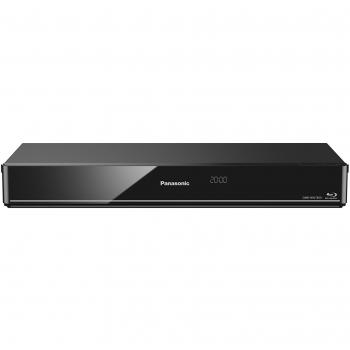
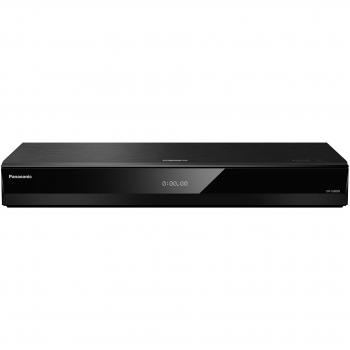
 Panasonic DVD-S500 DVD Player
The Panasonic DVD-S500 is a sleek, black DVD player that offers high-quality video and audio playback. It supports various formats, including DivX, MP3, and JPEG, and features easy-to-use controls for seamless navigation
Stores where to buy this product
 LaptopHub
 Eibmarkt.com

Panasonic DVD‑S500 – A Comprehensive Overview
The Panasonic DVD‑S500 is a compact, tabletop DVD player that delivers reliable playback for a wide range of media formats. Designed with simplicity and versatility in mind, it offers an array of features that make it suitable for both casual users and those who need advanced functionality such as CD ripping or JPEG slideshow support.
Key Design Features
- Form Factor: Tabletop design with dimensions 310 mm (width) × 204 mm (depth) × 39 mm (height). Weighs approximately 1.1 kg, making it easy to place on a TV stand or shelf.
- Color: Sleek black finish that blends seamlessly with most home entertainment setups.
- Power: Operates from an AC mains supply of 220–240 V at 50 Hz. Power consumption is 10 W during normal operation and only 0.5 W in standby mode, ensuring energy efficiency.
- Connectivity: Equipped with a single composite video/audio output (RCA), one 21‑pin SCART connector for RGB output, and a USB 2.0 port on the front panel for media transfer or CD ripping.
Audio & Video Performance
- Video Decoding: Supports progressive scanning with a 12‑bit/108 MHz digital‑to‑analog converter, delivering clear picture quality on NTSC and PAL signals.
- Audio Decoding: Features a 24‑bit/192 kHz audio D/A converter. Compatible with MP3, AAC, AAC+, WMA, and Dolby Digital formats, providing high‑fidelity stereo output.
- Output Options: Includes headphone jack (3.5 mm) and line‑out for connecting to external speakers or a home theater system.
- Dynamic Range & SNR: Offers an impressive 90 dB signal‑to‑noise ratio, ensuring crisp audio with minimal distortion.
Supported Media Formats
The DVD‑S500 is a true multi‑format player. It can read and write the following media types:
- CDs: Audio CDs, CD‑R, CD‑RW, SVCD, Video‑CD.
- DVDs: DVD‑ROM, DVD‑R, DVD‑RW, DVD‑+R, DVD‑+RW, DVD‑+R DL, DVD‑R DL, DVD‑R W.
- Video Formats: XviD video files (commonly used for compressed DVDs), JPEG images for slideshow playback.
- Audio Formats: MP3, AAC, AAC+, WMA, Dolby Digital.
Advanced Features
- CD Ripping & Burning: The built‑in USB port allows you to rip audio tracks from CDs and burn them onto CD‑R or CD‑RW discs. This is ideal for creating backup copies or compiling personal music libraries.
- JPEG Slideshow: Supports JPEG image playback, enabling users to display photo collections directly on their TV screen.
- Power Resume (Sleep Timer): The device remembers the last position when power is lost and resumes playback automatically once powered back on. A sleep timer can be set for automatic shut‑down after a specified period.
- Alarm Clock Function: Built‑in alarm feature allows you to wake up to your favorite music or video at a scheduled time.
- Weather Forecast Display: Integrated weather information can be shown on the LCD screen, providing useful daily updates without needing an external device.
Control & User Interface
- Remote Control: Comes with a standard infrared remote for convenient operation from across the room.
- LCD Display: A small but clear LCD screen displays playback status, track information, and menu navigation cues.
- LED Indicators: Power LED shows when the unit is on; additional LEDs may indicate USB activity or error states.
Installation & Setup
- Place the DVD‑S500 on a stable surface near your TV or monitor.
- Connect the composite video cable to the corresponding input on your TV. For higher quality RGB output, use the SCART connector if supported by your display.
- Plug the power cord into an outlet and turn on the unit using the power button located on the front panel.
- Use the remote or front‑panel buttons to navigate the menu system. The first-time setup will guide you through selecting language, time zone, and other preferences.
Maintenance & Care Tips
- Keep the optical drive tray clean by gently wiping it with a soft cloth before inserting discs.
- Avoid exposing the unit to extreme temperatures or direct sunlight, which can affect internal components.
- If you notice any playback issues, try cleaning the disc surface and ensure that the disc is free of scratches.
Conclusion
The Panasonic DVD‑S500 stands out as a versatile, feature‑rich DVD player that caters to both basic playback needs and more advanced media management tasks. Its compact design, broad format support, and thoughtful features such as CD ripping, JPEG slideshow, and power resume make it an excellent choice for anyone looking to extend the life of their existing disc collection or create new digital libraries.
| This product in Comparor | |
|---|---|
|
Category
This product is cataloged in our store in these categories
|
- DVD Players |
|
International
Find this product in one of our international stores
|
 167.00 EUR   45.99 EUR  46.63 EUR  44.99 EUR  106.22 EUR  167.00 EUR |
| Colors
Predominant colors of the product |
|
| Tags | Panasonic DVD-S500 DVD |
| Identifiers | |
| Brand |  Panasonic is a Japanese electronics company that produces a wide range of electronics products, including televisions, DVD players, and digital cameras. The company has a strong reputation for quality and innovation, and its products are popular among consumers. Panasonic also manufactures a wide range of home appliances, including refrigerators, microwaves, and dishwashers. |
| Model | Panasonic DVD-S500EG-K |
| MPN | Panasonic DVD-S500EG-K |
| ID | 7630010 |
| Dimensions / Weight | |
| Key Features | |


Related articles