
 Fujitsu KB410 USB slim value Tastatur auf 105 Tast
Fujitsu (4053026437943 / S26381-K511-L478) - Cable length: 1.85 m - Wired - USB - Standard - Mechanical - QWERTY - Straight - PC/server - Office - Monotone - Full-size keyboard - LED indicators - Numeric keypad
Stores where to buy this product
Similar products

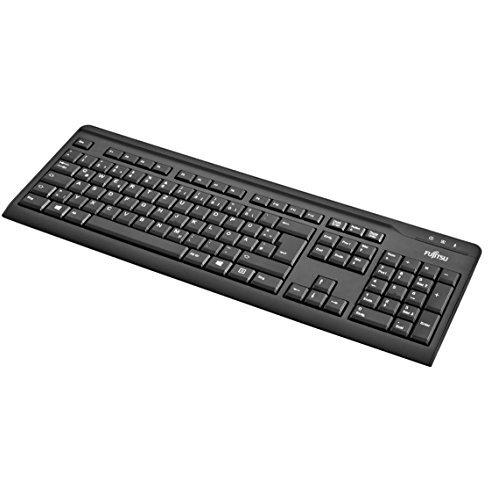
Fujitsu KB410 USB Slim Value Keyboard
The Fujitsu KB410 is a high‑performance, full‑size mechanical keyboard designed for professional and office environments. With its robust build quality, ergonomic layout, and comprehensive compatibility with Windows operating systems, this keyboard delivers reliable typing experiences for both everyday tasks and demanding workflows.
Key Features Overview
- Mechanical Switches: The keyboard employs durable mechanical key switches that provide tactile feedback and a satisfying click sound. This enhances typing accuracy and reduces fatigue during extended use.
- Full‑Size Layout with Numeric Keypad: Equipped with a complete set of keys, including a dedicated numeric keypad, the KB410 supports all standard functions required for data entry, spreadsheet manipulation, and programming.
- Standard Form Factor: The keyboard’s straight design offers a familiar typing angle that aligns with most ergonomic setups. Its compact form factor maintains a slim profile while preserving full functionality.
- USB Connectivity: A reliable wired USB interface ensures low latency and plug‑and‑play compatibility across a wide range of PCs, servers, and workstations.
- Cable Length: The 1.85 m cable provides ample reach to accommodate various desk configurations without compromising stability.
- LED Indicators: Built‑in LED indicators provide visual status feedback for power and connectivity, enhancing user awareness during operation.
- Weight & Build: Weighing just 553 g, the keyboard balances portability with a solid feel that resists accidental movement on the desk.
Certification & Compliance
The Fujitsu KB410 meets stringent international safety and environmental standards. It holds certifications such as TÜV GS, CE, FCC B, CSAc/us, WEEE, VCCI, KC, BSMI, SASO, ensuring compliance with electrical safety, electromagnetic compatibility, and waste management regulations across multiple regions.
Operating System Compatibility
This keyboard is fully compatible with a broad spectrum of Windows operating systems. Supported versions include:
- Windows XP (Home & Professional, 32‑bit & 64‑bit)
- Windows Vista (Business, Enterprise, Home Basic, Home Premium, Ultimate – all 32‑bit & 64‑bit)
- Windows 7 (Home Basic, Home Premium, Professional, Starter, Ultimate – all 32‑bit & 64‑bit)
- Windows 8 and Windows 8.1 (Standard, Enterprise, Pro – all 32‑bit & 64‑bit)
The plug‑and‑play design eliminates the need for additional drivers or software installations, allowing immediate use upon connection.
Recommended Usage Scenarios
- Office Productivity: Ideal for word processing, email correspondence, and data entry tasks where precision and speed are essential.
- Data Analysis: The numeric keypad facilitates rapid input of numbers in spreadsheets and databases.
- Programming & Development: Mechanical switches provide tactile feedback that many developers prefer for coding sessions.
Design & Aesthetics
The keyboard features a monotone surface coloration, offering a clean and professional look that blends seamlessly with corporate office environments. Its straightforward design emphasizes functionality over flashy aesthetics, ensuring the focus remains on typing performance.
Environmental Responsibility
With RoHS compliance, the Fujitsu KB410 eliminates hazardous substances such as lead, mercury, cadmium, and certain flame retardants. This commitment to environmental stewardship aligns with global sustainability initiatives and reduces ecological impact.
Product Specifications Summary
| Specification | Details |
|---|---|
| Backlight | No |
| Cable Length | 1.85 m |
| Connectivity Technology | Wired (USB) |
| Keyboard Form Factor | Standard, Straight |
| Key Switch Type | Mechanical |
| Layout | QWERTY (Full‑size with numeric keypad) |
| Weight | 553 g |
| LED Indicators | Yes |
| Windows Keys | Yes |
| Surface Coloration | Monotone |
| RoHS Compliance | Yes |
Conclusion
The Fujitsu KB410 USB Slim Value Keyboard stands out as a reliable, feature‑rich solution for professionals seeking mechanical typing precision without unnecessary extras. Its comprehensive certifications, broad Windows compatibility, and ergonomic design make it an excellent choice for office environments where durability and performance are paramount.
| This product in Comparor | |
|---|---|
|
Category
This product is cataloged in our store in these categories
|
- Keyboards |
|
International
Find this product in one of our international stores
|
  |
| Colors
Predominant colors of the product |
|
| Tags | Fujitsu KB410 USB |
| Alternative searches | USB keyboard KB410 keyboard HP USB keyboard 105-key keyboard Dell USB keyboard Apple USB keyboard KB410 USB keyboard Cherry USB keyboard Lenovo USB keyboard 105-key USB keyboard Fujitsu USB keyboard Dell 105-key keyboard Fujitsu slim keyboard Logitech USB keyboard Fujitsu KB410 keyboard Fujitsu keyboard KB410 KeyTronic USB keyboard Microsoft USB keyboard Fujitsu 105-key keyboard Logitech 105-key keyboard Fujitsu KB410 USB keyboard |
| Identifiers | |
| Brand |  Fujitsu is a Japanese multinational information technology equipment and services company. It is the world's fourth largest IT services provider measured by revenues. |
| Model | Fujitsu S26381-K511-L478 |
| MPN | Fujitsu S26381-K511-L478 |
| ID | 14589517 |
| Dimensions / Weight | |
| Key Features | |
| Backlight | No |
|
Cable length The linear distance that a cable covers, expressed with a length unit such as meters, centimeters or inches. It represents the total usable length of the cable for connecting devices.
|
1.85 m |
|
Certification A list of official certifications or compliance marks that the product has received from regulatory bodies, safety organizations, or industry standards groups. Each entry represents a distinct certification such as CE, FCC, RoHS, UL, or WEEE, and may include additional details like version numbers or specific test reports.
|
TÜV GS, CE, FCC B, CSAc/us, WEEE, VCCI, KC, BSMI, SASO |
|
Connectivity technology The network and data interface technologies supported by the product, such as Wired, Wireless, USB, Bluetooth, or combinations thereof. Each value represents a distinct technology that can be used for communication or power delivery.
|
Wired |
|
Device interface List of physical or logical interfaces that a device can use to connect with other components, such as USB, PCI Express, SATA, Ethernet, Thunderbolt, DisplayPort, and similar technologies. Each value represents an interface standard supported by the device.
|
USB |
|
Fingerprint reader Indicates whether the device includes a built‑in fingerprint reader for biometric authentication. A value of "Yes" means the device has a functional fingerprint reader; "No" indicates it does not.
|
No |
|
Full-size keyboard Indicates whether the product includes a full‑size keyboard, meaning a standard layout with all keys (including space bar, return, and function keys) arranged in a conventional arrangement suitable for typing on a laptop or desktop. A value of "Yes" means the device has such a keyboard; "No" indicates it does not.
|
Yes |
|
Internal Indicates whether the product is designed to be installed inside a computer system or other device, such as an internal hard drive, SSD, network card, or component. A value of "Yes" means it can be mounted within the chassis; a value of "No" indicates it is intended for external use.
|
No |
|
Keyboard form factor Represents the physical layout or size classification of a keyboard, such as full‑size, mini, tenkeyless (TKL), or other common form factors used in computer input devices.
|
Standard |
|
Keyboard key switch The mechanical or non‑mechanical mechanism that activates each key on a keyboard, such as mechanical, membrane, scissor, opto‑mechanical, or semi‑mechanical. It indicates how the key registers input and affects typing feel, durability, and noise level.
|
Mechanical |
|
Keyboard layout The arrangement of keys on a keyboard, indicating the language or region it supports (e.g., QWERTY, UK QWERTZ, AZERTY). This attribute helps users identify which typing layout is available for the device.
|
QWERTY |
|
Keyboard style A concise description of the physical shape or layout style of a keyboard, such as "Straight", "Curved" or "Numeric". It indicates whether the keys are arranged in a flat, angled, or numeric‑only configuration and helps users identify the typing experience and ergonomics of the device.
|
Straight |
|
Keyboard weight The mass of a keyboard expressed in a standard unit such as grams or kilograms. It indicates how heavy the keyboard is and can be used for shipping calculations, handling instructions, or consumer information.
|
553 g |
|
LED indicators A list of the functions or statuses that an LED indicator on a device can display, such as power status, activity, link, and other operational signals.
|
Yes |
|
Mouse included Indicates whether a mouse is supplied as part of the product’s standard package or bundle. A value of "Yes" means a mouse is included and ready for use; a value of "No" means no mouse is provided and must be purchased separately.
|
No |
|
Number of products included The total count of individual items that are part of the product package or bundle. It indicates how many separate units, components, or accessories are supplied together in a single purchase, regardless of type or function. The value is expressed as an integer without any unit of measure.
|
1 pc(s) |
|
Numeric keypad Indicates whether the product includes a numeric keypad area on its keyboard, typically found in full-size or laptop keyboards with an integrated numeric section.
|
Yes |
|
Plug and play Indicates whether the product can be used immediately after installation without requiring additional configuration or drivers.
|
Yes |
|
Pointing device The type of pointing device integrated into or used with the product, such as a touchpad, clickpad, trackpoint, or mouse. The value is a free‑text label that identifies the specific form factor or mechanism the user interacts with to move the cursor or select items.
|
No |
|
Purpose The purpose indicates the primary function or intended use of a product, such as "Notebook", "Gaming", or "Server". It helps customers quickly identify whether the item matches their needs and can be used for filtering or categorization across different product categories.
|
PC/server |
|
Recommended usage A brief statement of the intended or most suitable use cases for a product, such as the type of environment (indoor, outdoor), activity (gaming, office work, music listening) or general application category. It helps customers quickly determine whether the item fits their needs.
|
Office |
|
RoHS compliance Indicates whether the product is manufactured in accordance with the RoHS (Restriction of Hazardous Substances) directive, which limits the use of certain hazardous materials in electrical and electronic equipment.
|
Yes |
|
Surface coloration Represents the visual appearance or pattern applied to a product’s surface, such as a single color (monotone), an image, or a repeating design. It indicates how the exterior of the item is finished and can be used to differentiate models or styles.
|
Monotone |
|
USB Hub Indicates whether the product includes an integrated USB hub. The value is "Yes" or "No", allowing users to quickly determine if additional USB ports are available.
|
No |
|
Windows keys The total count of individual key switches present on a keyboard or similar input device, including all standard, function, and special keys. This value indicates how many separate keys are available for typing, gaming, shortcuts, or other functions, regardless of layout or branding.
|
Yes |
|
Wrist rest Indicates whether the product includes a wrist rest or support feature that provides ergonomic cushioning for the user's wrists during use.
|
No |
Related articles

Fujitsu fi-7460 A3 Document Scanner with Duplex Functionality, 60ppm Speed, and USB 3.0 Connectivity
Fujitsu fi-7460 A3 Document Scanner with Duplex Functionality, 60ppm Speed, and USB 3.0 Connectivity

