
15.28 GBP
 Logitech Desk Mat Studio Series Grey
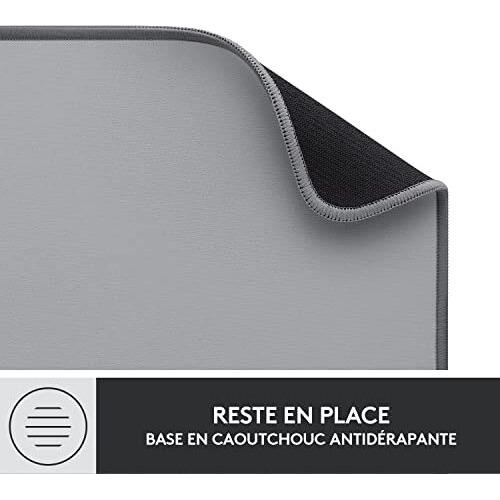
Logitech Desk Mat - Studio Series, 700mm x 300mm, Grey. Monochromatic surface coloration, made of nylon polyester with rubber stitched edges and non-slip base
Stores where to buy this product
 gotraka.com
 GamingKit
 Quzo
Quzo
Logitech Desk Mat Studio Series Grey
The Logitech Desk Mat Studio Series Grey is a premium workstation accessory designed to enhance both comfort and productivity. Crafted with precision, this large desk mat offers an expansive surface that accommodates keyboards, mice, pens, and other office essentials while protecting the underlying table or desk from scratches, spills, and wear.
Design & Build Quality
The Studio Series Grey showcases a monochromatic grey finish that blends seamlessly into any modern workspace. Its sleek profile features stitched edges, preventing fraying and ensuring the mat remains intact even after prolonged use. The matte surface provides an optimal balance between smooth glide for mouse movements and tactile feedback for typing.
Sturdy Construction
The mat’s construction incorporates a rubber base that anchors it firmly to the desk, eliminating unwanted sliding during intense work sessions or gaming marathons. This anti‑slip foundation is engineered to withstand heavy keyboard presses and frequent mouse adjustments without shifting.
Materials & Construction
The core of the Desk Mat Studio Series Grey is a high‑density nylon/polyester blend, chosen for its durability, resistance to wear, and smooth feel. The upper layer is treated to be spill‑resistant, allowing accidental coffee or water droplets to bead up and roll off rather than soak into the fabric.
- Nylon/Polyester Fabric: Offers a soft yet resilient surface that supports both optical and laser mice with minimal friction.
- Rubber Base: Provides grip and stability, preventing accidental movement during use.
- Stitched Edges: Enhances longevity by reinforcing the perimeter against tearing.
Dimensions & Fit
The mat measures 700 mm in width and 300 mm in depth, translating to a generous 30 inches by 12 inches area. This size is ideal for:
- Dual‑monitor setups where the mouse and keyboard need ample space.
- Creative professionals who require room for drawing tablets or styluses.
- Gamers seeking a large, uninterrupted surface for rapid cursor movements.
The thickness of approximately 2 mm ensures a stable platform without adding bulk to the desk.
Functional Features
Spill‑Resistant Surface
A key attribute is its ability to repel liquids. The treated fabric causes spills to bead and roll off, protecting both the mat and the underlying desk from stains or damage.
Anti‑Slip Base
The rubber backing keeps the mat stationary, even when heavy keyboards are pressed or during vigorous mouse movements. This stability is crucial for maintaining precision in tasks that demand fine control.
Ergonomic Support
While primarily a surface protector, the mat’s smooth texture reduces friction between the mouse and desk, minimizing wrist strain over long periods of use.
Usage Scenarios
- Office Work: Provides a clean, organized area for typing, note‑taking, and quick reference materials.
- Creative Design: Offers ample space for sketching tablets, color palettes, and design software interfaces.
- Gaming: The large surface accommodates rapid mouse movements and keyboard shortcuts without interruption.
- Home Study: Creates a dedicated study zone that keeps learning materials separate from the rest of the desk.
Maintenance & Care
Keeping the Desk Mat Studio Series Grey in pristine condition is straightforward:
- Wipe Down: Use a damp cloth with mild soap to remove dust or fingerprints. Avoid harsh chemicals that could degrade the fabric.
- Dry Naturally: Allow the mat to air dry completely before placing it back on the desk to prevent mold growth.
- Avoid Sharp Objects: Keep knives, scissors, and other sharp tools away from the surface to avoid punctures.
Environmental Considerations
The mat is manufactured with sustainability in mind. The nylon/polyester blend can be recycled, and Logitech’s production processes aim to reduce waste and energy consumption. By choosing this product, users contribute to a more eco‑friendly office environment.
Compatibility & Integration
This desk mat works seamlessly with all standard keyboards and mice, including optical, laser, and gaming models. Its size accommodates:
- Full‑size mechanical or membrane keyboards.
- Ergonomic vertical mice and traditional mouse designs.
- Pen holders, sticky notes, and small accessories that benefit from a protected surface.
User Experience
Customers consistently praise the mat for its:
- Smooth Glide: The mouse moves effortlessly across the surface, enhancing precision.
- Durability: Even after months of heavy use, the fabric remains intact and free from fraying.
- Aesthetic Appeal: The neutral grey tone complements a wide range of décor styles.
Conclusion
The Logitech Desk Mat Studio Series Grey is more than just a protective accessory; it’s an investment in workspace efficiency, comfort, and longevity. With its robust construction, generous dimensions, spill‑resistant surface, and anti‑slip base, this mat delivers reliable performance across office, creative, and gaming environments. Its thoughtful design ensures that every keystroke and mouse click is supported by a stable, clean, and visually appealing foundation.



Related articles


